Decision models often break quietly. A new constraint looks good locally. All integration tests pass. It gets pushed to production…and now solutions degrade by 10%. Huh? 😲 How did that happen? How can you prevent this? The answer: CI/CD.
In a previous post, we explored the ins and outs of what CI/CD is for decision science. It’s worth a read, but the gist to know for what’s to come below:
When developing a decision model, you have to ask more than, “Does this decision service talk to this other application just as well as it did before?” or “Does this scale?” You also have to consider the decision quality the app outputs. You have to address the question, “Is this decision good for the business today?"
The example I use to illustrate this in the post is of a delivery app considering distribution of temperature-sensitive goods like ice cream. While certainly a tasty expansion opportunity, what if new ice cream model logic actually increases total route duration (or other KPIs) beyond your business-mandated limits? Is it worth it? (To which I ask: When is ice cream not worth it?) Decision quality matters.
In this post, I’d like to highlight a pattern for how to implement CI/CD for decision applications using all the DecisionOps niceties of Nextmv. We’ll start by reviewing a few key concepts and then dive into the good stuff 🍦.
Key concepts for a decision model CI/CD pipeline
Let’s get oriented to a few terms that are likely familiar to you and relevant to walking through a CI/CD pattern to consider for your team workflows.
Acceptance testing. KPI-driven tests that compare two models: a candidate (with ice cream logic) to a baseline (without ice cream logic) with user-defined pass/fail criteria or tolerance ranges. These are the most common types of tests run within CI/CD workflows connected to Nextmv.
Scenario testing. Systematic “what-if” testing that is more exploratory than acceptance testing. Functionally, scenario testing compares the output derived from the combination of one model version (with ice cream logic), a collection of inputs (last week’s deliveries), and specific configurations. It is a good precursor to acceptance testing.
Versions. Model updates or variants (e.g., different formulations). Why cut a new version? Maybe you added a new constraint (ice cream delivery) or objective function (balance ice cream deliveries across drivers and minimize time on road), exposed a new user-defined KPI (customer ice cream happiness quotient), or added a new data source. Similar to MLOps tools, Nextmv streamlines building out a model version registry that logs all binary artifacts pushed to the platform and makes them accessible to users.
Instances. A specific API endpoint for your application that represents a combination of a model version with configuration and execution environment. This is how you efficiently expose or roll out/back model versions for use and re-use in different development environments (staging and prod), regions (New York City and Boston), and even clients (3PL A and 3PL B). Instances are a necessary construct for operating and scaling CI/CD pipelines in a safe, systematic, and controlled way.
Lastly, if Git-managed code or tools are new to you, this Git basics for decision scientists and operations researchers is worth a read. OK, with those definitions out of the way, let’s dive into how these pieces fit together in a real-world CI/CD workflow 🐬 🥽.
A CI/CD dev-to-prod pipeline pattern with Nextmv
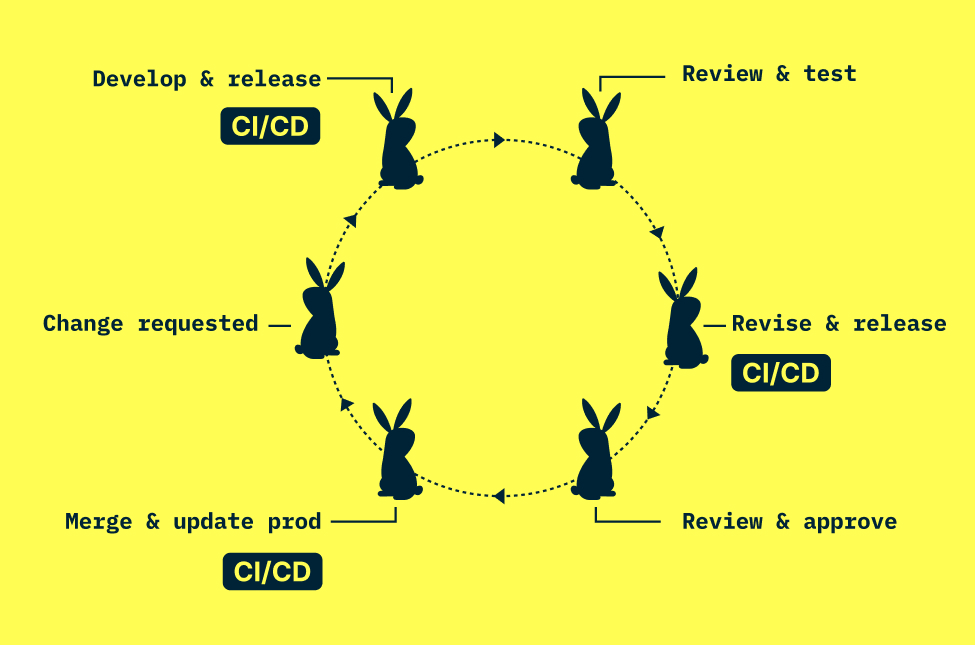
The most common automated CI/CD pipeline pattern we see with Nextmv leverages testing techniques alongside Nextmv instances at each step in the development cycle. (Note: For this example, we will reference GitHub as the Git management platform.) The high-level gist: change instigated → local dev → push code to GitHub → run tests via CI/CD → deploy new version to staging, prod, or other defined environment.
Now a deeper dive of a typical flow below, with a diagram to boot.
1. Change happens. A new corporate initiative (going green), offering (ice cream!), idea (balanced routes), surprise (flash sale) prompts a change to your decision model or algorithm.
2. Local development. Modeler works through requirements for the change and begins representing it in the model code. They run local tests and track those results in Nextmv. Those tracked runs include information about user-defined KPIs, I/O, and visualization for future reference.
🎵 Note: At this point in the flow, it’s good practice to include a workflow of actions in their Git-tracked code repository. In GitHub, for example, this is called GitHub Actions and I’ll reference the Nextmv GitHub Action, which wraps the full Nextmv CLI, in the steps to come. (GitLab and Bitbucket have equivalent offerings.) These pipelines are triggered by workflow files in the repository that can include steps for deployment, testing, and so on.
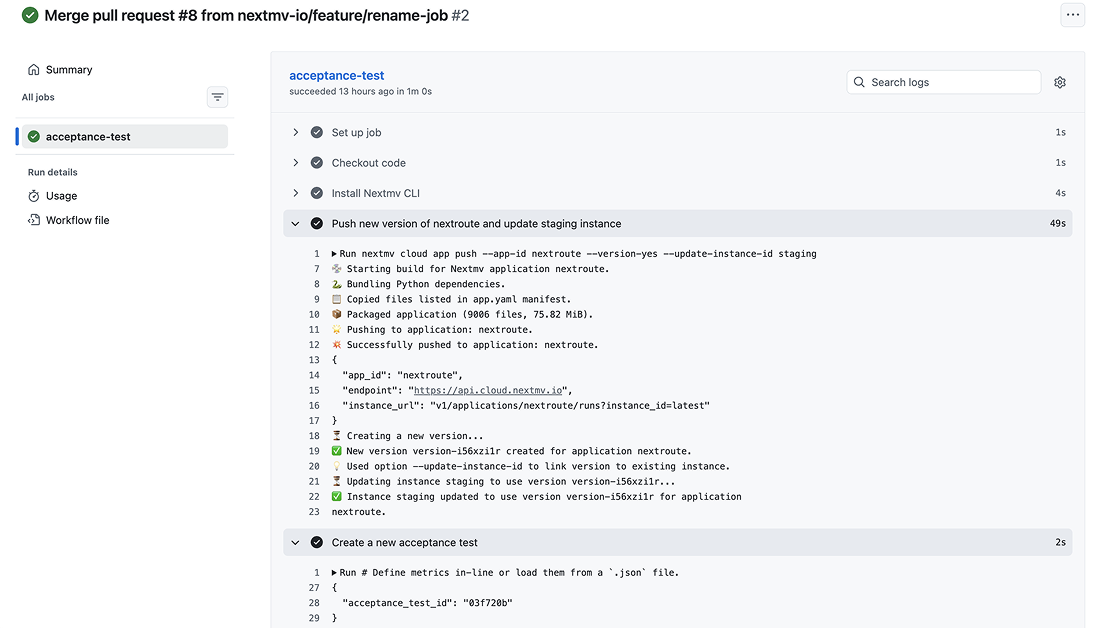
3. Push changes to GitHub, run CI/CD. When the modeler is ready for user testing, they push their changes to GitHub and this is where GitHub Actions takes over. A workflow YAML in the repo triggers the Nextmv GitHub Action to deploy the latest code to Nextmv, tag the code with a new version, update an instance (like staging) and run an acceptance test, all with Nextmv. The acceptance test evaluates KPIs such as unassigned stops and total route duration within user-defined thresholds. If it fails, the pipeline blocks the merge and the modeler revisits the changes (or updates acceptance criteria if business-acceptable). If it passes, the code clears for review. Either way, every version and test result is logged in Nextmv throughout.
4. Stakeholder review. Planners (or other stakeholders) can review and pressure-test changes in a staging instance (looks just like production, but doesn’t impact prod) within Nextmv. Typically these stakeholders will use scenario tests to evaluate variance in plans using different configurations (last-in-first-out constraint on or off) or input. They review KPIs (cost per order is increasing) and visualizations (are the routes overlapping?) and get familiar with the impact of the new changes or communicate feedback to the modeler.
5. More iteration and review (as needed). Steps 2 through 4 repeat until stakeholders are satisfied with their own scenario testing and evaluation, and the acceptance tests pass. Some teams initiate online tests like shadow and switchback to build even more confidence in their model changes over time using production data.
6. Merge PR, update production. Pretty straightforward. Once the new code changes are merged with the main or stable branch in GitHub, updating the production instance in Nextmv is a simple dropdown away. (And a rollback is just as easy, for what it’s worth.)

You can set all of this up in your Git tooling with Nextmv, and use the Nextmv GitHub Action to get started. It unlocks all the capabilities of the Nextmv CLI to build workflows that can run tests, log results, and make updates to your decision apps in Nextmv.
Check out this tutorial for how to set up a CI/CD pattern like this for your own decision model workflows.
Where to go from here
Producing quality decision code is critical to any number of business operations. CI/CD plays an important role in this process.
Most teams recognize the importance of having the infrastructure, tooling, and workflows on hand to ensure that quality in an efficient, repeatable, observable, and collaborative way. But building and maintaining it in-house is expensive and often requires dedicated engineering staff. Just like there are off-the-shelf platforms for payments, HR, or MLOps, Nextmv is the extensible platform for managing the end-to-end lifecycle of decision applications.
The pattern above (local dev, automated testing via GitHub Actions, stakeholder review and deployment) is something you can set up using the Nextmv GitHub Action or define your own CI/CD workflow that integrates Nextmv DecisionOps. If you’d like a sounding board while you set this up, just let us know. We’re happy to help.
Looking ahead, there are exciting tie-ins on the horizon that bring agentic collaboration into the CI/CD loop. With the release of the Nextmv MCP Server, there are interesting opportunities for doing anything from understanding test results to automating rollout/rollback using natural language in a safe and reliable way. Hold onto your hats, folks!