Recently, I tested code changes made to a decision model. The model developer I worked with shared his list of updates for me to work through and off I went on my merry QA testing adventure. Twenty minutes later I’d finished. Some things worked as expected, and some things didn’t.
For each item (working or broken) I provided a link to the specific run or view for my colleague to reference, reproduce, troubleshoot, and debug. While the latest model version was better, it wasn’t quite ready for complete roll out — but we got to that conclusion rather fast and efficiently.
In our experience, working through rollouts this quickly is not commonplace in decision science. Instead, model rollout feels risky and chaotic to manage, while model rollback feels frantic. This is because models are often tightly coupled with infrastructure and exposing or accessing model versions and all the runs (and metadata for I/O, metrics, etc.) associated with them are incomplete or nonexistent. It doesn’t have to be this way for your operations.
In this blog post, I’ll walk through an overview of hosting multiple model versions in Nextmv and the many ways you can manage them: development environment, geographic regions, clients and customers, and shadow mode.
Basics of managing model versions in Nextmv
A decision model is a living artifact that evolves over time. You add a new objective function. You adjust a constraint. You expose a new visual asset. You incorporate a new data source. All of these iterations can be captured as model versions. While a Git-based tool will track the code changes alongside a version, Nextmv makes those versions available for testing, QA, and roll out/back in an interactive and consistent way for your system or stakeholders.
While many practitioners may prototype with tools like notebooks, it is best practice to work with a git-based framework and be tied into CI/CD for decision workflows. Every time you iterate on your model, you have a new version you can reference, you have built-in operational resilience so one person can pick up where another left off, and you can help set code-readiness expectations with your end users.
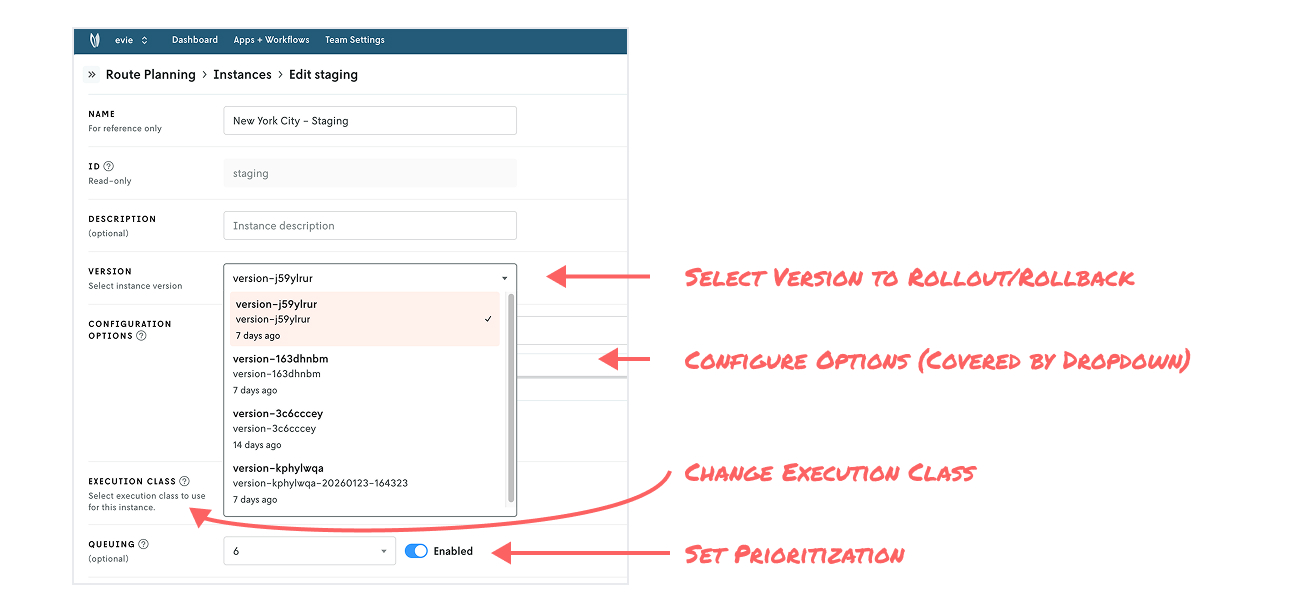
In Nextmv, applications are specific to a decision (e.g. room assignment) that can have multiple models associated with it (e.g. a rules engine or a simulation). Model versions are exposed through a construct called instances. You can think of instances as an environment that has an associated model version plus set configuration, such as solver, compute resources, prioritization, and option settings (e.g., clustering is on or off). Each instance you create has its own turnkey API endpoint.
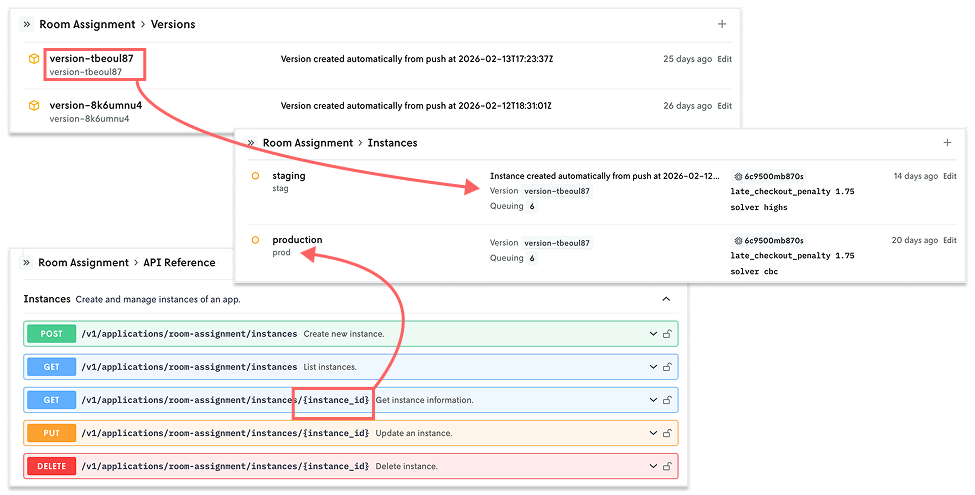
Together, these constructs provide a lot of flexibility for managing model iterations for decisions under different circumstances. Let’s take a look at a few examples.
Organize by development, staging, and production environments
The most common model versioning setup we see is organization by traditional development, staging, and production environments. These often map to various branches of development in tools like GitHub, GitLab, and Bitbucket. Teams can also set queue priorities for each environment (e.g., prioritize production runs over staging runs), different solver configuration (e.g., run an open source solver in development and a commercial solver in production), and apply different compute classes (e.g., standard compute for dev and larger compute for prod).
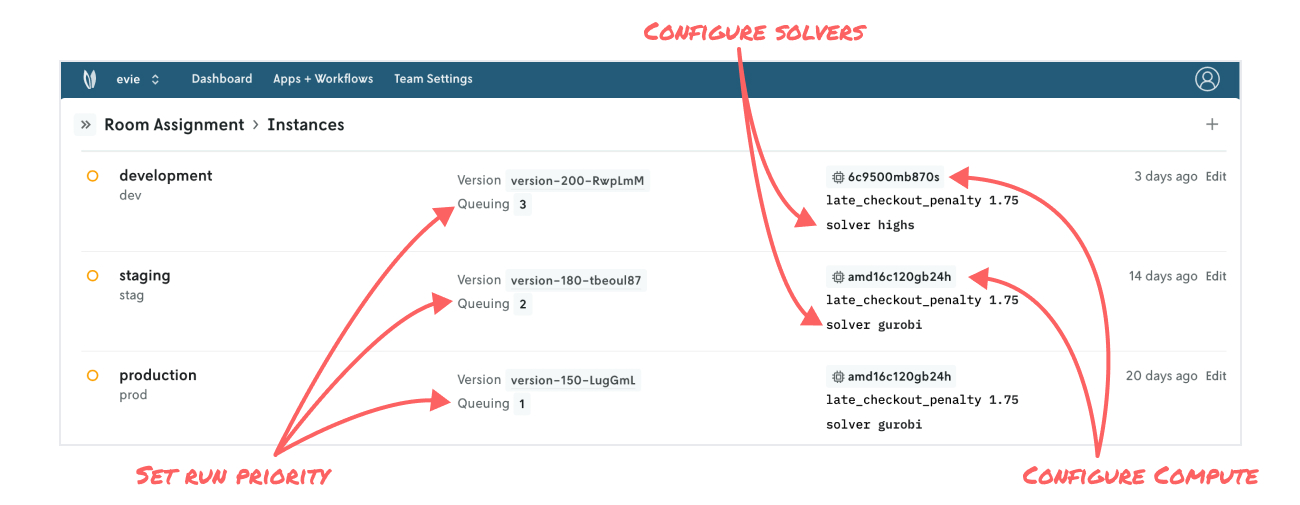
This style of model organization lends itself well to typical rollout management: development → staging → production. With each step, you’re using testing techniques along the way to build confidence by exploring different scenarios, performing sensitivity analysis, comparing specific runs, and more. And this approach applies for any type of decision application you push to Nextmv — from a price optimization MIP model to a SimPy simulation to a home-grown, rules-based engine.
When model versions are decoupled from the infrastructure, it’s easy to manage rollouts and rollbacks or test on staging without impacting production traffic.
Organize by geography, territory, region, or even orbits
Let’s say your organization powers shift scheduling operations in a number of US cities, and you have aspirations to grow more both domestically and internationally. Your core shift scheduling model is applicable across the majority of regions you operate in, but certain regions may have different configurations, perhaps with pricing models and varying rates, for example.
In this case, New York City may operate using premium rates, whereas Houston operates using standard rates. You may be considering expansion to San Francisco, another city where premium rates will apply, but since it’s a prototype, you prefer to use an open source solution for now instead of a commercial solver.
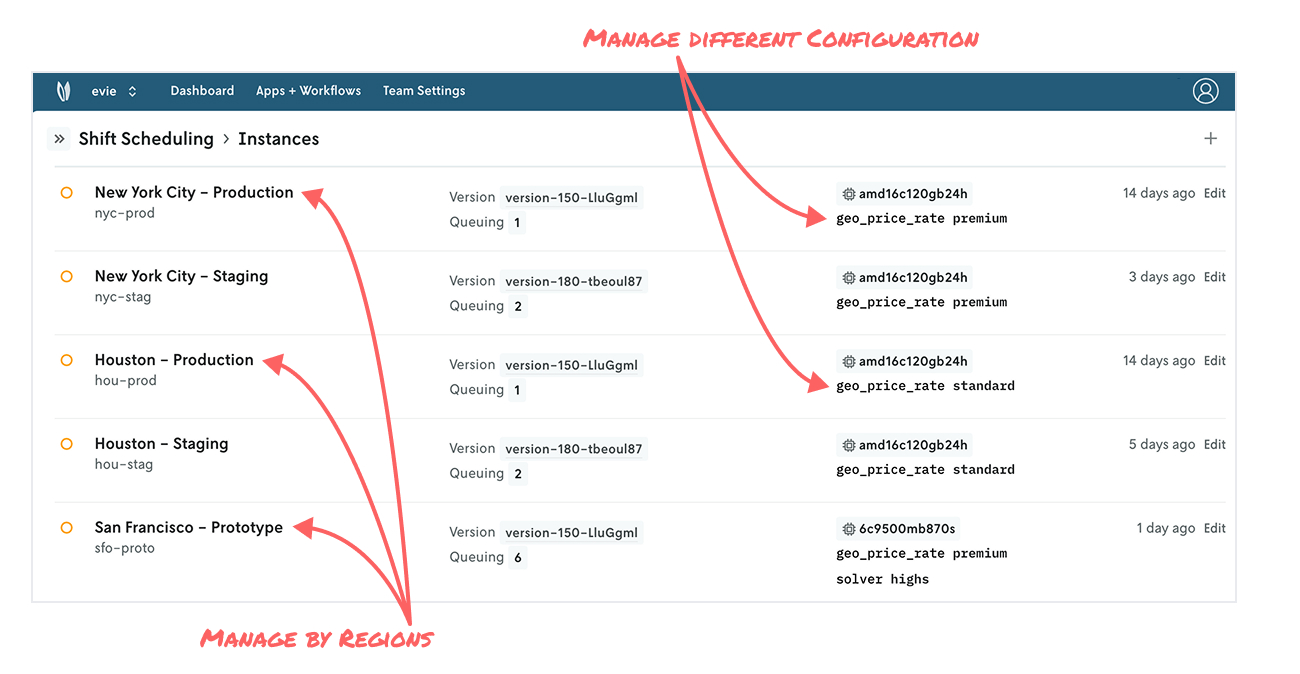
Whether you think about your model application by neighborhoods, cities, countries, sales territories, or geospatial orbits, instances provide a lot of flexibility to re-apply your modeling work at scale while adhering to the uniqueness of a given slice of our universe.
Organize by client or customer
Whether you’re a service/solutions provider with multiple customers or part of the rich ecosystem of decision science consultants in the industry, you’re no stranger to managing multiple projects, clients, and stakeholders. You may have a route optimizer applicable to multiple customers operating in different regions, but they have different configurations when it comes to clustering routes or vehicle requirements. Or one client may have a larger fleet to volume of stops to consider compared to more traditional clients, so you can configure higher execution classes that one to run for longer.
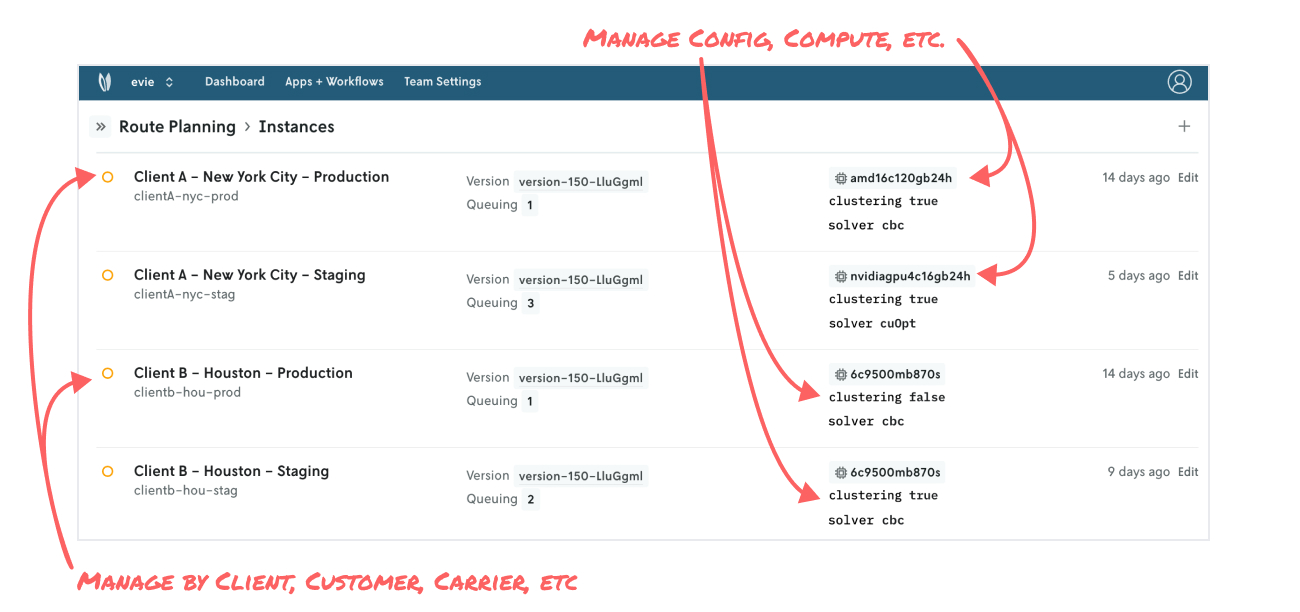
As client and customer feedback comes in for model improvements or new business requirements to account for, all of the run and experiment history is readily available to present, helping reduce overall project timelines.
Running shadow mode, alternate plans, and having a backup
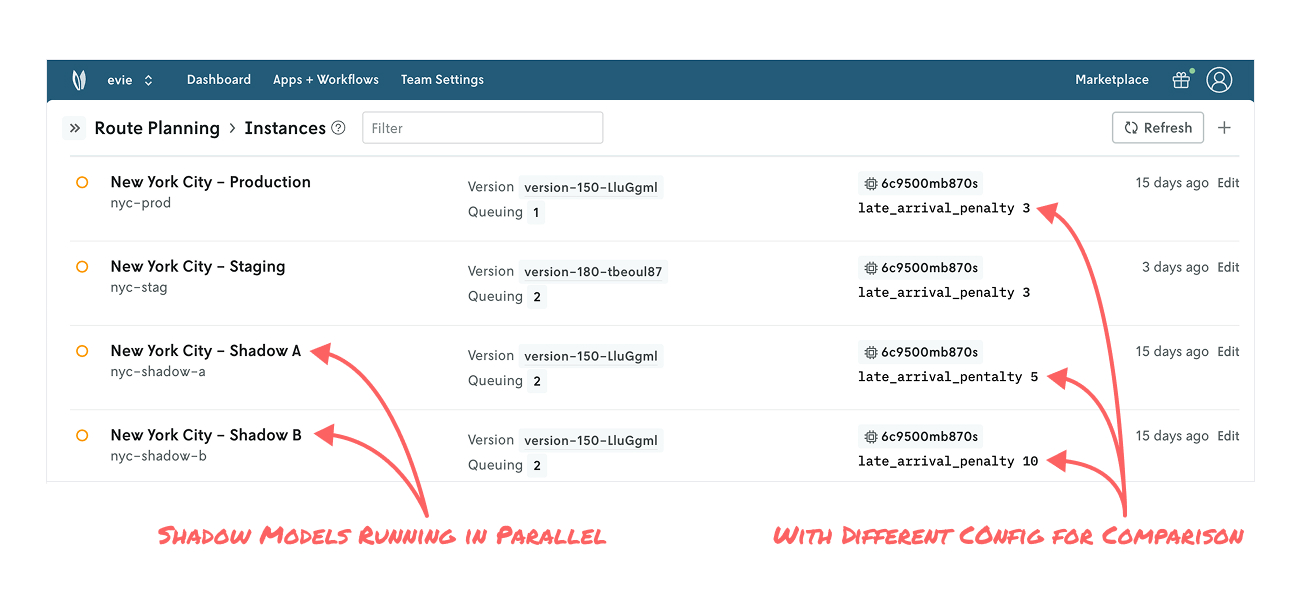
The last setup we’ll explore is shadow mode, which can take a few forms. First, some basics: Running a candidate model in shadow mode means the candidate model’s output doesn’t actually impact downstream systems like the production model, but you have all the data to analyze its performance under real-world conditions. This is a useful approach for amassing a larger set of data points with the goal of ultimately rolling out to production. It’s also useful for evaluating multiple candidates in parallel.
In a simple case, you might run a candidate model (e.g., New York City - Shadow) you’re developing in parallel with your production model (e.g., New York City - Production). In a more complex case, you may run multiple configurations of your model (e.g., New York City - Shadow A, New York City - Shadow B, etc.) alongside production with the goal of analyzing what-if scenarios on live data. This allows for richer conversation between modelers and business users looking to understand alternate plans.
Another variation is automatically producing a backup solution. Let’s say you have a MIP model that sometimes returns an infeasible solution, but not having a solution is not acceptable. With Nextmv, you can configure a parallel model, perhaps based on a greedy heuristic, that will automatically step in with a plan that may not be optimal, but it’s good enough to sustain your operations while you troubleshoot the MIP model.
Finally, in all cases, model rollout and model rollback is as simple as editing an instance and selecting a version. It’s that easy. No lengthy service code deployment from your engineering team necessary.
Phew! We covered a lot. Let’s wrap up and recap.
Next moves
We explored several ways for managing decision model versions using the construct of instances in Nextmv. The platform provides these adaptable building blocks for representing your model development and business operations any way you like. The result: decision science teams have proper ownership over the end-to-end process of their decision app development. Plus, they have a better interface with engineering to add to overall decision system resiliency (and not add to their engineering backlog).
To get hands on, you can create a free Nextmv account or schedule a live demo to see all the goodness in action. May your solutions be ever improving 🖖